 Tako Docs
Apply Atomic Constraints
Prevent selected atoms or Cartesian components from moving during supported calculations, such as holding a host or slab fixed while relaxing a guest or adsorbate.
Before you begin
Distinguish three controls:
- A layer lock prevents interactive editing.
- Layer visibility controls display.
- An atomic constraint changes the calculation degrees of freedom.
Only the third is a scientific constraint.
Procedure
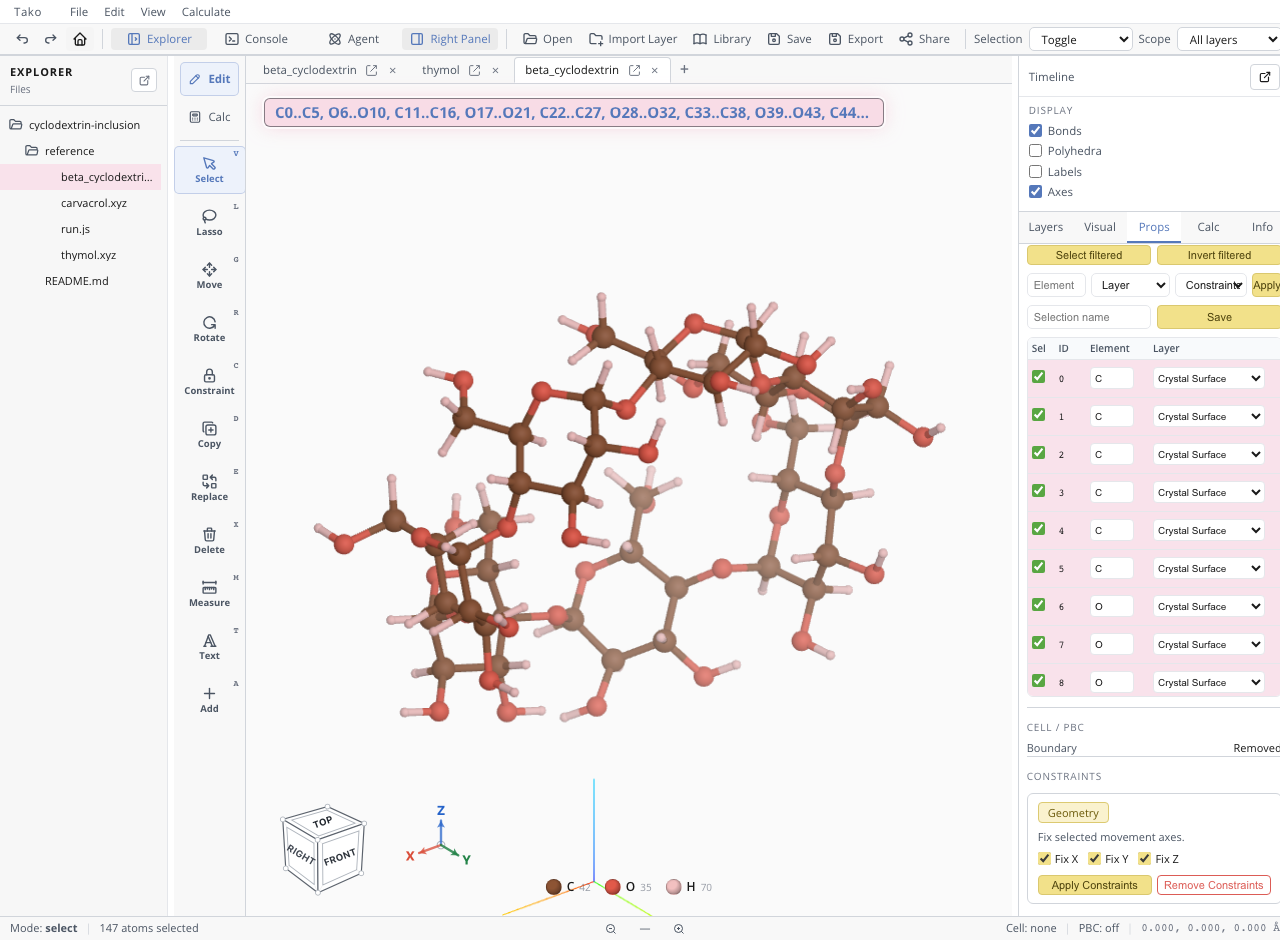
- Switch to Edit and select the intended atoms.
- Open the Constraints tool.
- Enable Fix X, Fix Y, and/or Fix Z.
- Apply the constraint and inspect the selected atoms or property table.
- Save the constrained structure so its
selectiveflags are preserved. - Run a short test optimization and inspect the trajectory before starting a long workflow.
Use all three axes to hold atoms completely fixed. Use partial Cartesian constraints only when the coordinate system and physical rationale are explicit.
Verify the result
| Check | Pass condition |
|---|---|
| Selected indices | Exactly the intended atoms are constrained |
| Components | X/Y/Z flags match the physical model |
| Serialization | Saved structure preserves selective flags |
| Test trajectory | Fixed coordinates remain unchanged |
| Free region | Unconstrained atoms can still respond |
Note that convergence behavior can differ by operation. In some optimization paths, forces on constrained atoms may still influence the reported maximum-force criterion even though their coordinates do not move. Inspect both trajectory and force diagnostics.
Variants
- In Tako Script, use
tako.structure.fix(structure, indices)for fully fixed atoms and documented selective-coordinate helpers for partial constraints. - For surfaces, constrain physically justified bottom layers rather than every substrate atom by default.
- For host–guest screening, report clearly that a rigid-host energy excludes induced fit.
Troubleshooting
| Symptom | Likely cause | Fix |
|---|---|---|
| Host moves | Layer was locked but atoms were not constrained | Apply X/Y/Z constraints and rerun |
| Optimization never meets fmax | Constrained atoms retain large reported forces | Inspect free-atom motion and operation-specific force masking |
| Entire structure is immobile | Selection or scope included all atoms | Clear and reapply to intended indices |
| Constraints vanish after import/export | File format omitted selective flags | Use extXYZ/workspace formats that preserve metadata |
| Partial constraint acts in wrong direction | Cartesian axes do not match intended surface/cell direction | Inspect axes and use a deliberate coordinate frame |